
Turn your WordPress site into a full ordering system
Install one plugin and the website you already own starts taking orders — with a live order board inside wp-admin, your real menu, correct totals at checkout, and payments landing in your own account. No rebuild, no theme change, no commission.
- 0% commission
- Keep your theme
- Orders inside wp-admin
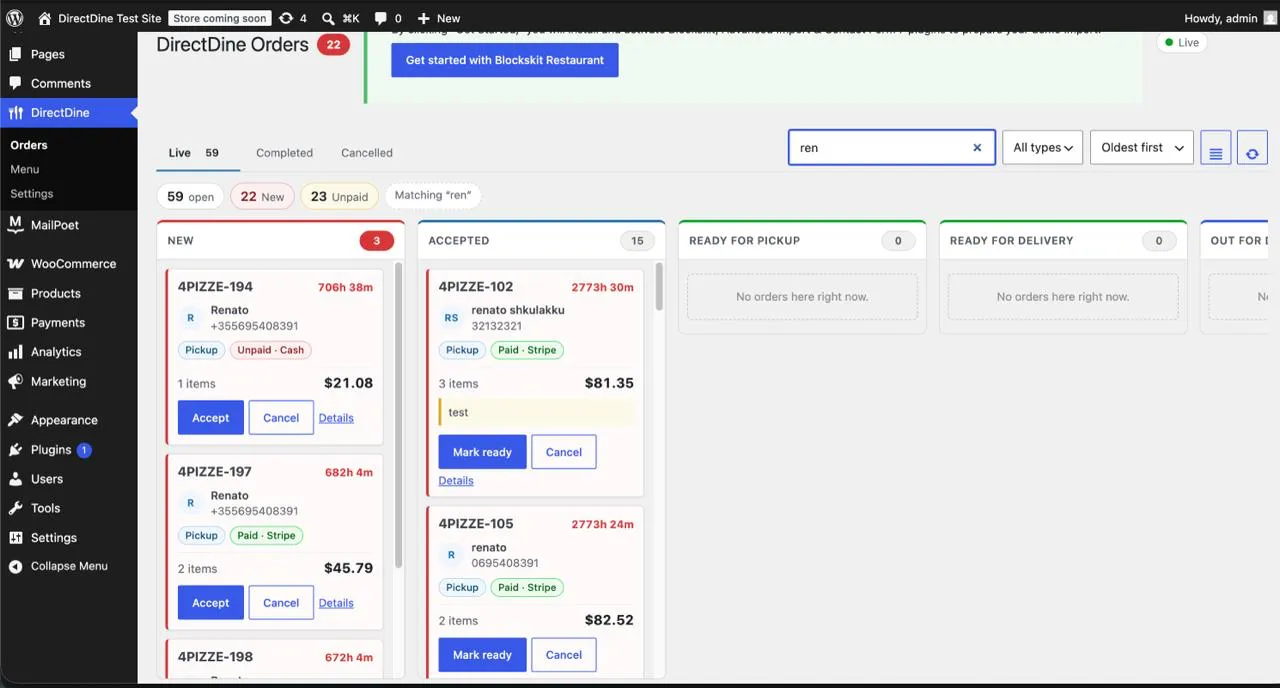
Your website already has your customers on it. It just cannot take their order.
Most restaurants end up running two things at once: a WordPress site for the brand, and a delivery app for the orders — paying 15–30% for customers who were already on their own website. The Direct Dine plugin closes that gap. Your existing pages, theme and domain stay exactly as they are; ordering, checkout and the kitchen flow are added underneath them.
What the plugin adds to your site
Everything below happens inside WordPress. Your team never has to open a second dashboard to run a normal service.
Live order board in wp-admin
New, accepted, ready for pickup, ready for delivery and out for delivery — as columns that update on their own. Accept, mark ready or cancel from the card, search by name or phone, and filter by order type.
Your menu, managed from WordPress
Categories, products, sizes, modifier groups and prices, all editable from wp-admin. Sold out? Toggle an item off and it disappears from every channel within a minute. Images come straight from your media library.
One-click menu import
Bring the menu you already have — including WooCommerce products — with a single sync. It matches on names, never deletes anything, and can be run again safely if you change your mind.
Checkout with real totals
Tax, delivery fee, service fee and tips are calculated by Direct Dine and shown before the customer submits, not after. The plugin holds no price logic of its own, so what the customer sees is what gets charged.
Payments to your own account
Card payments run through your own Stripe, PayPal, Square, Clover or Paysera account, plus cash on collection. Every online charge is verified with the provider before an order is ever marked paid.
Bookings and daily numbers
A table-booking form for your site, and a dashboard widget showing today's orders, revenue and what is still pending — on the first screen your team sees when they log into WordPress.
From install to first order
Four steps, and only one of them is on you.
-
1
We set your restaurant up
Locations, opening hours, delivery zones and your payment accounts are configured with you, and we issue your licence key.
-
2
Install the plugin, paste the licence
The setup wizard connects the site itself and binds the connection to your domain. There are no API keys to copy around, and nothing secret ever touches the browser.
-
3
Sync your menu
Import what you already have, then keep editing from wherever suits you. Changes made in WordPress or in the owner app reach the other side in under a minute.
-
4
Start taking orders
Every order lands on the wp-admin board, the owner app and the kitchen screen at the same moment, and prints the same ticket.
How it fits what you already run
Your theme and page builder are untouched
The plugin adds ordering screens and a menu block. It does not restyle your site, take over your pages, or lock you into a template.
It runs alongside WooCommerce
Keep selling merchandise or vouchers through Woo if you already do. Food ordering, checkout totals and the kitchen flow are handled by Direct Dine, and your Woo products can be imported as a starting menu.
Food orders do not use WordPress payment gateways
This one is deliberate. An order is only marked paid once Direct Dine has verified the charge with the payment provider itself, which is what stops a compromised website from injecting fake paid orders. Your money still goes to your own account — the credentials just live on our side.
One licence can cover several sites
Useful for a group with a site per location. Each site binds its own connection, and you can disconnect or move one without touching the others.
Questions restaurants ask before installing
Do I have to rebuild my website?
No. The plugin installs on the WordPress site you already own and works with your current theme, pages and domain. Nothing about your design changes — ordering is added to it.
Does it work with WooCommerce?
Yes, side by side. If you already sell through WooCommerce you can keep doing it, and you can import your existing Woo products as the starting point for your Direct Dine menu. Food ordering, totals and the kitchen flow are handled by the plugin.
Where does the money go, and what is the commission?
Straight into your own payment account — your Stripe, PayPal, Square, Clover or Paysera. Direct Dine never holds the money and takes 0% commission on orders from your own website. You pay only your monthly plan.
Do I have to retype my whole menu?
No. The plugin imports the menu you already have in one sync, matching on names rather than replacing anything. After that you can edit from wp-admin or from the owner app, and both stay in sync within a minute.
Can my staff work entirely inside WordPress?
Yes, for everyday service. The order board, the menu and the daily stats are all in wp-admin. The owner app and the kitchen screen mirror the same orders in real time, so you can also use them if that suits the kitchen better.
Do customers leave my site to pay?
Cash orders are placed and confirmed without leaving your site. Card payments open your provider's secure hosted page for the payment itself and come straight back to your site, where the confirmed order is shown.
Ready to take orders on your own site?
Tell us your restaurant and your WordPress address. We will set the account up, issue your licence, and walk you through the install.
The plugin is issued with your account rather than downloaded from the WordPress directory, so every connection is tied to a real restaurant and a real domain.